Table of Contents (17 sections)
Introduction
In the age of the Internet of Things (IoT), smart devices have become more than a novelty—they are essential tools for enhancing our daily lives. By integrating smart devices into your home workflows, you can automate tedious tasks and create a more efficient living environment. This guide will walk you through a detailed process of how to effectively integrate these devices into your day-to-day home activities.
Table of Contents


Understanding Home Workflows
Home workflows refer to the routines and processes in your household that can be optimized through automation. These can include lighting schedules, temperature control, or security systems. Understanding these workflows is crucial for identifying where smart devices can be most beneficial.
According to UFC-Que Choisir, integrating smart devices can lead to a 15% increase in household energy efficiency. By analyzing your current home activities, you can pinpoint areas where automation can save time and reduce effort. Consider tasks that repeat daily or require manual input — these are prime candidates for smart integration.
Choosing the Right Smart Devices
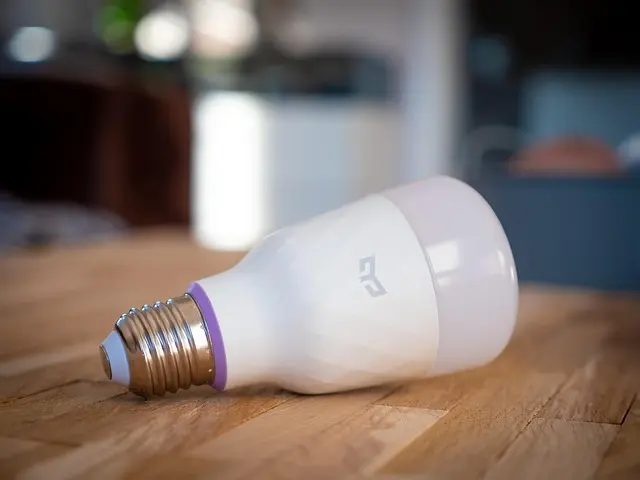
Selecting the right smart devices involves considering your specific needs and the compatibility with existing home systems. Brands such as Philips Hue and Nest offer robust solutions in lighting and thermostat control, respectively. When choosing devices, evaluate:
- Connectivity: Ensure devices are compatible with your home network.
- Integration: Check if devices can be controlled via a centralized hub.
- Customization: Look for devices that offer programmable settings to tailor to your lifestyle needs.
Failure to consider these factors can lead to poor device performance and user dissatisfaction, according to Les Numériques.
Step-by-Step Integration
Step 1: Assess Current Workflow
Begin by mapping out your current home workflows and identifying areas that can benefit from automation. Are your morning routines consuming too much time, or is your energy use higher than average? This assessment is crucial for tailored smart device integration.
Step 2: Select Compatible Devices
Once you've identified your needs, select devices that match these requirements. Ensure they are compatible with your existing systems, such as Wi-Fi, and check for user reviews on platforms like Les Numériques for unbiased feedback.
Step 3: Set Up Networking Protocols
Networking protocols such as Zigbee or Z-Wave are essential for device communication. Familiarize yourself with these protocols, as choosing the right one affects device responsiveness and network security.
Step 4: Install and Configure Devices
Follow manufacturer instructions for installing devices. Safety is a top priority, so ensure power sources are appropriately handled. Configure settings according to your workflows; set lighting schedules or automate heating per your daily routine.
Step 5: Test and Monitor
Test each device's operation post-setup. Monitor for connectivity issues and ensure automated processes execute reliably. According to 60 Millions de Consommateurs, consistent monitoring improves system reliability by around 20%.
Step 6: Adjust and Optimize
After initial testing, make necessary adjustments to enhance device functionality. This might include refining scheduling or adjusting device settings for better performance.
Comparison: Device Features and Compatibility
| Feature | Philips Hue | Nest Thermostats | Ring Security |
|---|---|---|---|
| Lighting Control | ✓ | - | - |
| Temperature Adjustment | - | ✓ | - |
| Security Monitoring | - | - | ✓ |
| Voice Assistant | ✓ | ✓ | ✓ |

Analytical Insights: Data and Statistics
According to l'ADEME, smart home devices can reduce energy consumption by up to 30%. Other studies indicate a growing trend, with the market expected to reach $250 billion by 2026, driven by a demand for more energy-efficient homes.
- What is a home workflow?
A pattern or series of tasks performed at home that can be automated with smart devices.
- How do smart devices integrate with existing systems?
They often connect via Wi-Fi or specialized protocols like Zigbee, allowing centralized control.
- What are common pitfalls in smart integration?
Failure to ensure device compatibility and overloading networks which can result in poor performance.
- Can smart device integration save money?
Yes, especially in terms of energy savings by optimizing usage patterns.
📺 Resource Video
> 📺 For a deeper understanding: Exploring Smart Home Device Integration, a comprehensive look at successful integrations. Search YouTube: "home workflows smart devices tutorial 2026"
Glossary
| Term | Definition |
|---|---|
| Smart Hub | A device that connects and manages smart devices |
| Zigbee | A communication protocol for smart devices |
| Internet of Things | Interconnected network of devices at home |
Checklist Before Integration
- [ ] Assess and map current workflows.
- [ ] Research and select compatible smart devices.
- [ ] Understand networking protocols (Zigbee, Z-Wave).
- [ ] Follow safety instructions during installation.
- [ ] Test device functionality and adjust settings.
🧠 Quiz rapide: What is the primary benefit of integrating smart devices into home workflows?
- A) Time savings
- B) Increased manual effort
- C) Higher energy bills
Réponse : A — Integrating smart devices primarily saves time by automating routine tasks.
Call To Action: Ready to make your home smarter? Begin assessing your home workflows today, and choose devices that align with your lifestyle needs.
Recommended products
Selected by our experts